|
Scope: Explore for all tickers
where the Volume has been below 1 for the last 22 bars. (Effectively
locates tickers with zero volume for approximately 1 month)
|
|
|
|
| Step 1
- Start AmiBroker and
PowerScan.
Note: If you have not yet installed either of these programs click
on the link to the download page and follow the installation
instructions.
|
|
|
|
| Step 2
- Setting exploration parameters.
Enter the following exploration parameters into PowerScan as
per the example.
|
| |
Example:
 |
|
|
|
| Step 3
- Enter your exploration criteria.
Enter the following criteria and click the !Run
button . This will launch the Amibroker automatic analysis
window (AA) and perform the exploration within AmiBroker.
|
| |
Common
Expression: The Volume for
the previous 20 bars has been below 1. |
Example:
 |
|
|
|
| Step
4 - Viewing the exploration results and saving results
to an AmiBroker watchlist.
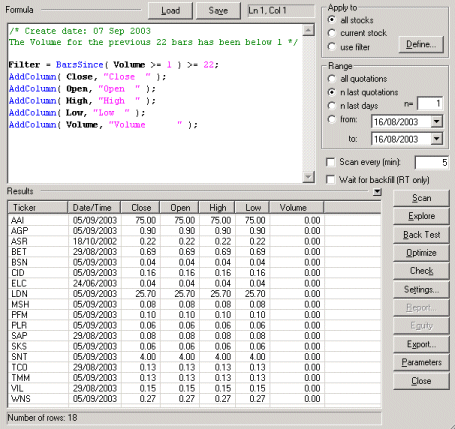
Note that there were a total of 18 tickers (see bottom
status bar of results pane) that meet the exploration criteria
of zero volume. To save these tickers to a watchlist for
further examination simply RMC (Right Mouse Click) on any of
the tickers in the AA (Automatic Analysis) grid and select the
menu option to: 'Add all results to watchlist'. then select
the desired watchlist from the list.
|
| |
|
|
|
|
Additional Information
This exploration is a quick and helpful method to locate tickers that
have stopped trading for approximately 1 month. You can vary the
number of days (bars) to suit your requirements.
Finished
|
